Launch Your EdTech Vision: Streamlining Mobile Design with a UI Kit
Designing an educational application from the ground up is an ambitious undertaking. It requires balancing complex user flows—like lesson navigation, progress tracking, and quiz interactions—with a clean, distraction-free aesthetic that keeps students engaged. For many developers and designers, the interface design phase becomes a bottleneck, consuming weeks of work before a single line of code is even written. The challenge isn't just making it look good; it's creating a functional, intuitive experience that feels professional and trustworthy.
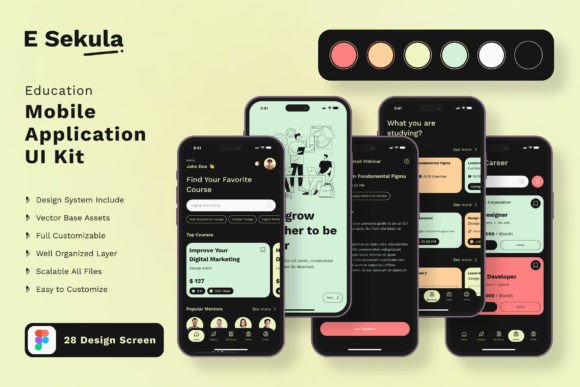
This is where a well-structured mobile UI kit becomes an invaluable asset. Think of it not as a rigid template, but as a foundational design system—a collection of pre-built, professionally crafted interface components that you can mix, match, and modify. Instead of starting with a blank canvas, you begin with a library of proven solutions for common educational app needs. The Education App Mobile UI KIT, for instance, provides exactly this kind of starting point, offering 20 pixel-perfect screen designs that serve as a springboard for your own unique creation.
A Toolkit Built for Clarity and Focus
What makes a UI kit specifically valuable for educational projects is its inherent focus on clarity. Learning environments demand interfaces that are easy to navigate, with clear visual hierarchies that guide the user's attention to the right content at the right time. The screens included in this kit—from detailed course listings and interactive lesson views to progress dashboards and profile settings—are designed with this pedagogical principle in mind. The layouts are clean, the typography is chosen for readability, and the interactive elements are intuitive.
Beyond the full-screen mockups, the real power lies in the component library. With over 80 individual UI elements, you have the building blocks to construct any screen you can imagine. Need a custom progress bar for a language learning app? It's there. Looking for a specific style of input field for a quiz answer? You'll find multiple options. This granular approach allows for immense flexibility. You can deconstruct the pre-made screens and reassemble the elements into entirely new layouts, ensuring your final product doesn't look like a generic template but a bespoke application tailored to your specific educational content and brand.
From Pre-Built Screens to Your Unique Brand Identity
A common concern with using design assets is the risk of a generic look. However, a high-quality UI kit is designed to be a starting point, not the final product. The key is in the customization. Because every element in this kit is built with 100% vector layers and is fully editable, you have complete control over the visual direction. The color palette, which is easy to change, can be instantly aligned with your brand guidelines. The free fonts included can be swapped out for your chosen brand typeface, or you can experiment with font pairings to establish the right tone—whether it's a friendly, approachable sans-serif for a children's app or a more formal serif for a professional development platform.
This adaptability extends to the core functionality. You can add or subtract elements from any screen. Perhaps you love the layout of a course detail page but need to add a "share with study group" button or a video preview thumbnail. The layered structure of the files in Adobe Photoshop, Adobe InDesign, and Sketch makes this straightforward. You're not locked into a static design; you're working with a dynamic system of components. This process dramatically accelerates the design-to-development handoff, as you can quickly create high-fidelity prototypes that accurately represent the final user experience.
Practical Applications Beyond the App Itself
The utility of these design assets often extends far beyond the primary mobile application. The cohesive visual language established using the UI kit can become the cornerstone of your entire brand identity. The icons, color schemes, and typographic choices can be extracted and applied to create a consistent look across all your marketing materials.
Consider these practical uses:
- Website and Landing Pages: Use the same clean layouts and component styles for your promotional website to create a seamless experience from ad to app store to site.
- Social Media Graphics: The icons and UI elements can be repurposed to create engaging, on-brand social media posts, story templates, and promotional banners for platforms like Instagram and LinkedIn.
- Investor Pitch Decks and Presentations: Professional screen mockups are essential for pitching your app idea. Having polished, realistic designs adds immense credibility.
- App Store Screenshots: The beautifully designed screens are perfect for creating compelling screenshots that showcase your app's features and design quality to potential users.
- Print Materials: The vector-based icons and graphics can be used in brochures, flyers, or even merchandise for your educational brand.
By using the Education App Mobile UI KIT as your design foundation, you're not just building an app screen; you're building a versatile visual system that ensures consistency and professionalism across every touchpoint where your audience encounters your brand. This consistency is crucial for building brand recognition and trust, especially in the competitive EdTech space.
Making the Design Process Work for You
To get the most out of a resource like this, it's helpful to approach it with a strategy. First, don't feel obligated to use every single screen or element. Browse the 20 templates to identify the layouts and components that best align with your app's core user journey. Start by customizing those key screens, establishing your color palette and typographic hierarchy. Then, use the individual UI elements to build out the remaining parts of your application flow.
Remember, the goal is efficiency and quality, not a shortcut to a finished product. The kit provides the professional polish and structural integrity of a well-designed interface, freeing you up to focus on what truly matters: your educational content, your pedagogical approach, and the unique value proposition of your application. It handles the heavy lifting of visual design, so you can pour your energy into creating an exceptional learning experience.
In the end, a resource like this is about empowering creators. Whether you're a solo entrepreneur validating an app idea, a developer needing a strong design foundation, or a design team looking to accelerate a project, having a robust, customizable UI kit removes a significant barrier. It transforms the daunting task of interface design into a manageable, even enjoyable, process of assembly and customization, helping you move from concept to a polished, launch-ready product with greater speed and confidence.