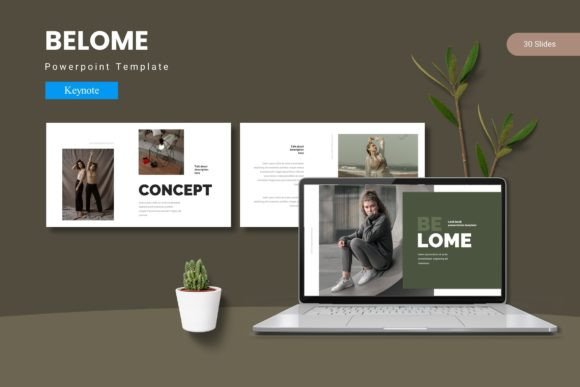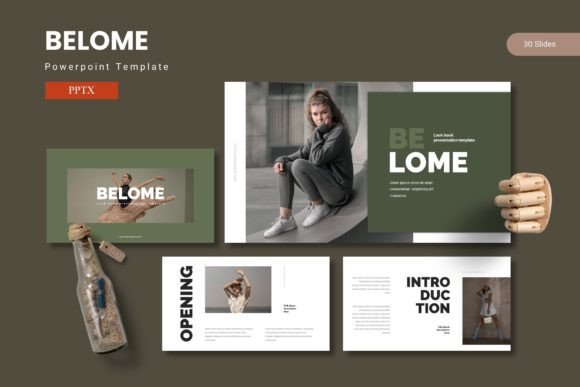
Belome - Powerpoint Template: Craft Presentations That Captivate
We’ve all been there—staring at a blank PowerPoint slide, cursor blinking, the pressure to create something professional and engaging mounting with every passing minute. Whether you’re pitching to investors, presenting quarterly results, or sharing a creative vision with your team, the design of your slides can make or break your message. That’s where a thoughtfully designed template steps in, not as a crutch, but as a launchpad for your ideas.
The Belome - Powerpoint Template is built for exactly this kind of moment. It’s more than just a collection of pre-made slides; it’s a versatile design system that blends data visualization, clean graphics, and impactful content layouts into a cohesive package. With over 150 total slides across five premade color schemes, it offers a substantial foundation for anyone who needs to communicate visually with clarity and style.
A Visual Toolkit for Real-World Communication
What makes a presentation template truly useful isn’t just the number of slides—it’s the intention behind each design choice. Belome includes handcrafted infographics, pixel-perfect illustrations, and layouts based on master slides, which means every element is designed to work together seamlessly. The picture placeholders are drag-and-drop ready, so swapping in your own images or product shots takes seconds, not hours.
Consider the practical applications. A small business owner preparing a pitch deck can use the data-driven slides to showcase market research and financial projections. A marketing professional can leverage the portfolio and gallery slides to present campaign results visually. Even a blogger or content creator preparing a workshop or webinar can use the template to structure their talk in a way that holds attention and reinforces key points.
Beyond the Slide Deck: Building Brand Consistency
One of the most overlooked aspects of professional presentation is consistency. When your slides reflect your brand’s color palette, typography, and visual language, you reinforce recognition and trust. The five color variations included with Belome aren’t just random palettes—they’re carefully curated to work across different industries and moods, from corporate to creative.
This consistency extends beyond presentations. The same visual language you develop for your slides can inform your social media graphics, website banners, or even printed materials. Using a cohesive design system like this helps bridge the gap between your digital and physical brand assets, creating a unified experience for your audience.
Practical Design That Respects Your Time
Time is a non-renewable resource, especially for entrepreneurs and creators wearing multiple hats. The Belome template acknowledges this by including features that streamline the design process. The master slide setup means you can make global changes to fonts or colors in one place, and those updates cascade throughout your entire deck. The resizable, editable graphics mean you’re not stuck with a static illustration that doesn’t quite fit your content.
Think about how often presentations need last-minute adjustments. A client requests a different color scheme. A new data point needs to be visualized. The modular structure of these slides—30 per template with clear section breaks—makes these revisions manageable rather than stressful.
Making Data Digestible and Stories Compelling
Effective presentations do more than display information; they tell a story. The infographic slides within Belome are designed to transform complex data into visual narratives. Whether you’re showing growth metrics, process workflows, or comparative analyses, the right visual representation can make your audience understand and remember your message.
This is particularly valuable for professionals who regularly present to non-technical audiences. A startup founder explaining a new technology, a nonprofit director showcasing impact metrics, or a teacher illustrating a complex concept—all benefit from visuals that simplify without dumbing down. The template’s design supports this by providing clear visual hierarchies and intuitive layouts.
Choosing the Right Tool for Your Presentation Goals
Not every presentation requires the same approach. A investor pitch demands different visual treatment than a creative portfolio review or an internal team update. The variety within the Belome package—with its mix of data-centric, image-focused, and text-driven slides—allows you to select and customize the right components for each specific context.
When selecting a template, consider your audience and objective first. Are you trying to persuade, inform, or inspire? The answer should guide which slides you emphasize and how you structure your narrative. A template should serve your message, not constrain it.
The included readme file with font and photo information is a practical touch that many templates overlook. It helps you maintain design integrity by guiding you toward complementary assets, ensuring your final presentation looks polished and intentional rather than pieced together.
In a world where attention spans are short and visual communication is paramount, having a reliable, flexible design resource isn’t a luxury—it’s a practical necessity for anyone serious about sharing their ideas effectively. The right tools don’t replace creativity; they amplify it, allowing you to focus on your message while trusting that the visual foundation is solid.