Streamline Your Slides with the Mount Keynote Template
You have ten minutes to pitch your life’s work to a room full of investors, or perhaps thirty minutes to present a quarterly review to stakeholders who are already checking their watches. You open your laptop, click on Keynote, and face the dreaded white void of a blank slide. We have all been there. It is the moment where creativity stalls and anxiety spikes. The difference between a mediocre presentation and one that captivates an audience often comes down to the foundation of the deck itself. This is where the Mount Keynote Template enters the conversation, not just as a set of pre-made slides, but as a comprehensive visual system designed to help professionals communicate with clarity and impact.
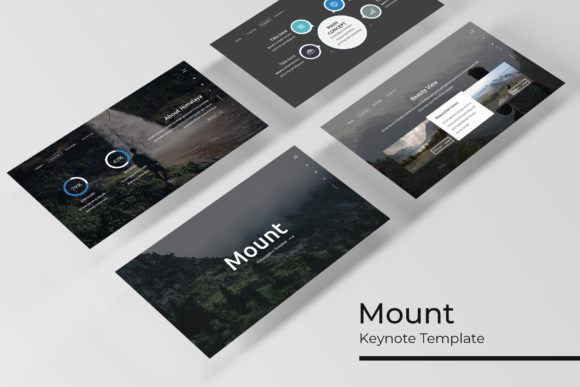
When we talk about modern visual communication, we are rarely just talking about the words on the screen. We are talking about hierarchy, flow, and emotional resonance. The Mount template was built with the understanding that a presentation is a visual narrative. With over 150 total slides included, it offers a robust library of layouts that move beyond simple bullet points. Whether you are a designer presenting a new brand identity, a marketer outlining a social media strategy, or a startup founder explaining a complex business model, having a versatile toolkit changes the game. It allows you to focus on your story rather than fiddling with alignment boxes and color hex codes for hours.
A Visual Toolkit for Every Narrative
One of the standout features of this package is the sheer volume of content provided without sacrificing quality. The inclusion of 150+ slides is impressive, but the structure is what makes it practical. The template comes in five premade color variations, with 30 distinct slides dedicated to each color scheme. This isn't just about changing a background from blue to green; it is about offering different moods and brand alignments right out of the box. If your brand leans towards corporate minimalism, there is a variation for that. If you are in a creative field requiring something more vibrant, the palette options accommodate that energy as well.
For anyone who has struggled with creating data-heavy presentations, the handcrafted infographics included in the pack are a lifesaver. We have all seen the standard pie charts and bar graphs that come with default software—they often feel sterile and disconnected from the rest of the design. The infographics in Mount are integrated into the design language of the slides, turning raw data into visual stories. This is particularly vital for marketing assets where data visualization needs to be both accurate and engaging. Furthermore, the inclusion of section break slides helps structure long-form presentations, giving the audience a mental pause and keeping the narrative organized.
Practicality Meets Pixel-Perfect Design
In the fast-paced world of small business ownership and content creation, time is a currency you cannot afford to waste. The Mount Keynote Template addresses this through its "drag & drop" functionality based on master slides. If you have ever tried to resize an image in a presentation only to have the layout break apart, you will appreciate the picture placeholders designed here. These placeholders allow you to drag an image from your folder directly onto the slide, and it automatically crops to fit the design frame perfectly. This feature alone can save hours of formatting time, especially when dealing with portfolio slides or gallery layouts where visual consistency is paramount.
Moreover, the graphics are fully resizable and editable. This means you aren't stuck with a static icon set. If you need to adjust the size of an illustration to fit a specific packaging design mockup or tweak a graphic to match a web design element you are presenting, the vector-based nature of these assets allows for infinite scaling without loss of quality. This flexibility is crucial for designers who need to present concepts to clients. You can take a slide from this template, modify the graphics, and use it as a standalone visual for a poster or digital product mockup. The "pixel-perfect" claim isn't just marketing speak; it refers to the alignment grids and optical spacing that make the slides look professionally typeset by default.
Beyond the Slides: Versatility in Application
While the primary function of the Mount Keynote Template is obviously for keynote presentations, smart creatives know how to repurpose assets. Think of the 150+ slides not just as a presentation deck, but as a library of design assets. The layout grids used for the slides are identical to those used in editorial design for magazines or blogs. A slide designed for a team introduction can easily be exported as a high-resolution image and repurposed for an "About Us" section on a website or a printed brochure.
Consider the social media graphics potential. Instagram carousels, for instance, thrive on consistent visual storytelling. You could use the 30 slides from a single color variation to create a month's worth of cohesive Instagram content. The visual consistency is already baked in, ensuring that your feed looks curated and professional. Similarly, the layouts work beautifully for merchandise mockups or invitations. By stripping away the text and focusing on the composition of shapes, images, and negative space, you can create sophisticated event invites or product tags that maintain a high-end aesthetic.
Technical Details and Workflow Integration
For the professional designer or entrepreneur, the technical specifications of a template matter just as much as the aesthetics. The package includes five PPTX files in widescreen format, ensuring compatibility with modern monitors and projectors. A common pain point with templates is font compatibility; nothing ruins a design faster than opening a file to see "Arial" substituted for a missing typeface. Mount mitigates this by utilizing a free font and including a download link in the Readme file. This is a thoughtful touch that demonstrates an understanding of the user’s workflow. You don't need to purchase expensive premium fonts to make the template look exactly like the preview.
The reliance on Master Slides is another technical highlight that deserves attention. For those unfamiliar, Master Slides allow you to make global changes to your presentation. If you decide halfway through that you want to change the footer text or adjust the background color of all 150 slides, you can do it in one click rather than editing each slide individually. This structural integrity makes the Mount Keynote Template a scalable solution. Whether you are using it for a one-off pitch or as the foundation for a recurring monthly report, the file remains manageable and easy to update.
Ultimately, the goal of any creative font or template is to remove friction from the creative process. The Mount Keynote Template achieves this by providing a structured yet flexible environment. It respects the user's time by offering drag & drop ease, respects the user's budget by including free font solutions, and respects the user's need for quality with pixel-perfect illustrations. It is a practical investment for anyone looking to elevate their brand recognition and professional presentation without starting from a blank canvas.