Designing Scroll-Stopping Content with the Creative Nest Template
You’ve spent hours perfecting your product photography, tweaking your caption until it’s just right, and scheduling your post for peak engagement times. You hit publish, scroll down your feed, and—your content vanishes into the endless sea of beige minimalism and generic graphics. If your brand voice is getting lost in the noise, the issue might not be your message, but the visual container you are using to hold it. Good design isn't just about decoration; it is about communication architecture. When you need to convey complex information—like a service menu, a product launch timeline, or a tutorial—you need a layout that guides the eye rather than confusing it. This is where the Creative Nest - Instagram Post template comes into play, offering a structured yet highly customizable foundation for your social media strategy.
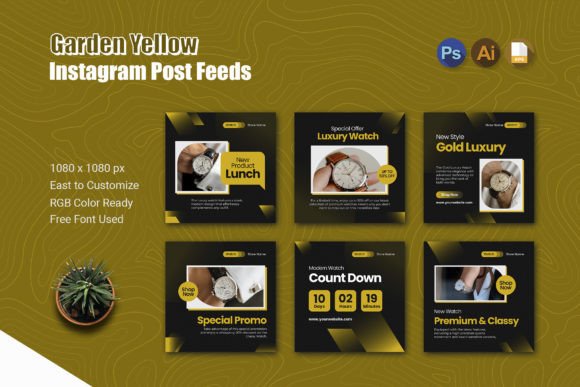
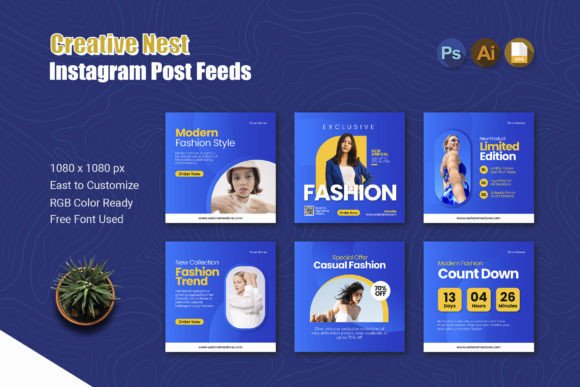
Think of this template not just as a digital file, but as a blueprint for visual consistency. We often talk about the importance of a "brand voice," but the visual "face" of your brand is equally critical. When a follower sees your post in their feed, they should recognize it as yours within a fraction of a second, even before reading the text. This level of recognition requires a consistent layout system. The Creative Nest - Instagram Post package provides exactly that—a cohesive set of six distinct pages that share a common design DNA. By utilizing these layouts across a campaign or a week of content, you create a rhythm that your audience becomes familiar with, building trust and anticipation for what you are going to share next.
More Than Just a Layout: Understanding the Design System
At its core, the Creative Nest - Instagram Post is built for versatility. One of the biggest hurdles in content creation is starting from a blank canvas every single day. It is exhausting and leads to inconsistency. This template solves that by giving you a starting point that is already professional. The square 1080x1080 pixel format is the universal language of Instagram, ensuring your content looks crisp on high-resolution screens and fits perfectly in the grid view.
What sets this specific asset apart is the file inclusion. You aren't just getting a static image; you are getting the working files. Whether you prefer working in Adobe Photoshop, Illustrator, or an EPS-compatible editor, the files are ready for you. This is a massive advantage for designers and business owners who want to maintain brand integrity. You can input your specific brand hex codes, swap out the placeholder text with your brand fonts, and drag-and-drop your own photography into the mockups. The "RGB Color" specification ensures that your colors remain vibrant and true to life on digital screens, which is vital for visual impact.
Practical Applications for Entrepreneurs and Creatives
Let’s move past the technical specs and look at how this actually functions in a real-world workflow. If you are a small business owner, time is your most scarce resource. You likely don't have the budget to hire a graphic designer for every single Instagram story or feed post. The Creative Nest - Instagram Post bridges that gap.
Imagine you are launching a new product. You have six key points to hit: the problem it solves, the features, a testimonial, a "how-to" use guide, the price, and a call to action. Instead of cramming all of this onto one cluttered image, you can use the six-page structure of this template to create a cohesive carousel post. Carousels are algorithmically favored because they increase dwell time—users swipe to see the next slide. By using a consistent template, the user knows exactly how to consume the information, making the experience seamless.
- Service-Based Businesses: Use the pages to break down a complex service package. Page 1 is the hook, Pages 2-4 explain the benefits, and Pages 5-6 handle pricing and booking instructions.
- Restaurants and Cafes: Showcase a new menu item. Use high-quality mockups to display the food, and use the text areas to list ingredients or allergen information.
- Content Creators: Create educational "infographic" style posts. Break down a tutorial or a "Top 5 Tips" list, ensuring each slide is visually distinct but connected.
The ability to change mockups is particularly useful here. If the default mockup doesn't fit your aesthetic, you can easily swap it for a device frame that matches your brand's tech stack or a lifestyle image that resonates with your target demographic.
Enhancing Visual Consistency and Brand Recognition
Visual consistency is the secret weapon of successful branding. When you look at major brands, their social media feeds look like a curated gallery, not a random collection of ideas. This is achieved through strict adherence to design systems. By adopting a template like the Creative Nest - Instagram Post, you are essentially adopting a design system.
The benefit here is twofold. First, it saves you decision fatigue. You don't have to decide where to put the text or how to align the images; the template has already solved those problems for you. Second, it creates a "visual anchor" for your audience. Over time, your followers will associate that specific layout style with your content. This is how you stop the scroll. When a user sees your distinct visual style, they pause because they know value is coming.
Consider the typography aspect. While the template includes a free font, you are encouraged to customize it to match your brand identity. If your brand uses a modern sans-serif for headers and a serif for body copy, apply that here. If you use a handwritten script for accents, incorporate that. The "Easy to customize" feature means you aren't locked into a generic look. You are simply using the structural skeleton provided by the template to house your unique brand elements.
Designing for Engagement: Tips for Using the Template
Simply having a good template isn't enough; you need to use it effectively to drive engagement. Here are a few practical tips for getting the most out of this asset:
Focus on the "First Slide" Hook. In a carousel format, the first image is everything. Use the template's layout to create a strong, bold statement or a provocative question. Don't clutter this first slide. Let the design breathe.
Utilize Negative Space. Good design relies on what you don't include as much as what you do. If you are customizing the text areas, ensure you aren't overwriting them. Leave margins. If you find the text is getting too long, edit your copy, not the design. The template is sized to be readable, but only if you respect the space.
Color Psychology. The template uses RGB color, which is perfect for digital vibrancy. Use this to your advantage. If you want to evoke energy and urgency, use warm colors like reds or oranges for your background or accents. If you want to convey calm and trust, use blues or greens. Ensure your text has high contrast against the background to maintain accessibility and readability for all users.
Final Thoughts on Professional Presentation
In the crowded digital landscape, amateur-looking graphics can actually hurt your credibility. Users subconsciously associate visual quality with the quality of the product or service being offered. Using a premium, well-structured template like the Creative Nest - Instagram Post elevates your presentation instantly. It signals that you care about details, which translates to trust in your business operations.
Whether you are a designer looking for a quick base to speed up client work, or a small business owner trying to manage your own marketing, having a library of high-quality, customizable templates is a game-changer. It allows you to focus on what really matters: the value you provide to your audience. Stop wrestling with pixel-perfect alignment and start communicating your message with clarity and style. Your next viral post might just be one template customization away.